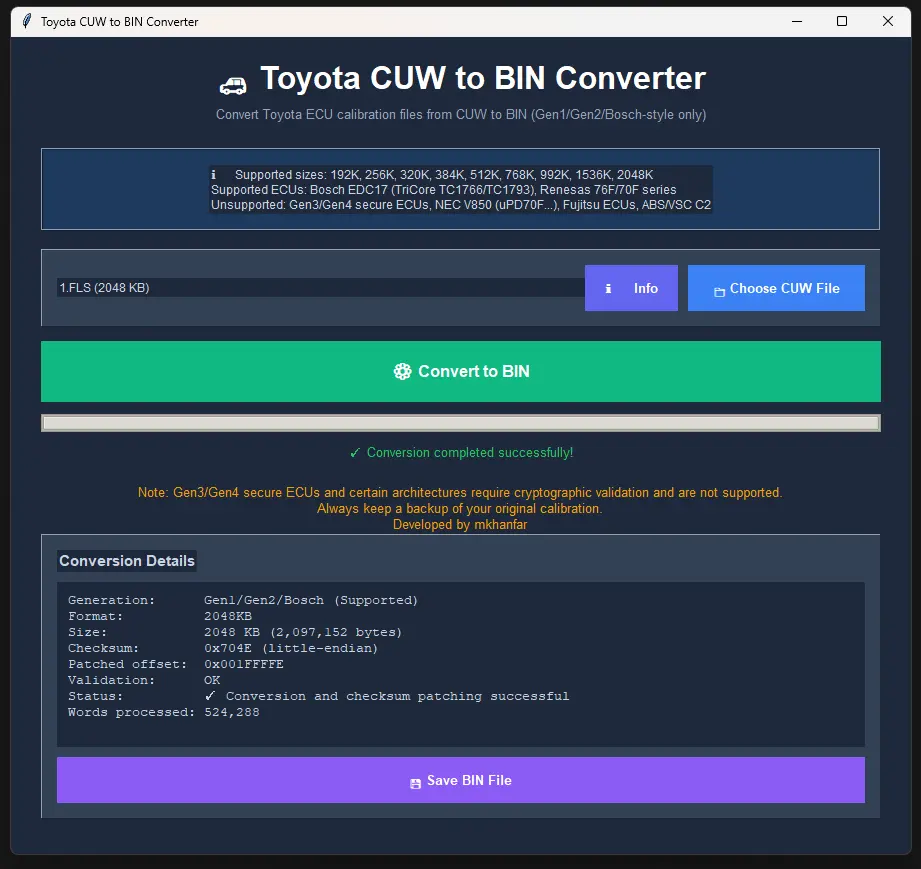
Convert Toyota ECU calibration update files (CUW) into BIN format with ease.
×
About the Software
The Toyota CUW to BIN Converter is a modern GUI tool designed to decode official Toyota ECU calibration update files (CUW) into binary format (BIN).
Developed by Mkhanfar, this software supports multiple ECU families and ensures checksum correction for safe flashing.
✅ Automatic format detection for sizes: 192K, 256K, 320K, 384K, 512K, 768K, 992K, 1536K, 2048K.
✅ Nibble-level deobfuscation of 32-bit words.
✅ Checksum calculation and automatic patching.
✅ Modern GUI with progress bar, status messages, and conversion details.
✅ Safe rejection of unsupported Gen3/Gen4, NEC V850, Fujitsu, and ABS/VSC controllers.
Important Note
This software supports only fixed-size CUW files from Gen1/Gen2/Bosch ECUs.
Supported sizes are: 192K, 256K, 320K, 384K, 512K, 768K, 992K, 1536K, 2048K.
Files with irregular sizes (e.g. 488K, 659K, 824K, 1259K, 2341K) or cryptographic signatures
(Gen3/Gen4 ECUs, NEC V850, Fujitsu, ABS/VSC controllers) are not supported.
Supported ECU List
Renesas 76F0002 – 32B256K
Renesas 76F0004 – 32B320K
Renesas 76F0012 / 76F0015 – 32B192K
Renesas 76F0023 – 32B384K
Renesas 76F0038 / 76F0038A – 32BH768K
Renesas 76F0039 / 76F0039A – 32BH512K
Renesas 76F0040 / 76F0040A – 32BH384K
Renesas 76F0050 – 32BL384K
Renesas 70F4019M – Gearbox ECU
Renesas 76F0092GJ – Power ECU
BOSCH EDC17CP07 – Infineon SAK-TC1766
BOSCH EDC17C47 – Infineon TC1793
BOSCH TC1793 – TriCore ECU
Note: Gen3/Gen4 ECUs (FOREST series, NEC V850, Fujitsu, ABS/VSC controllers) are not supported.
Unsupported File Types
CUW files larger than 2048KB (e.g. 2341KB)
CUW files with irregular sizes (e.g. 488KB, 659KB, 824KB, 1259KB)
Hybrid ECUs and VSC/ABS/ECB controllers
Gen3/Gen4 ECUs with cryptographic signatures
Note: These files require different tools and are not convertible with this software.
Download
You can download the software using the button below. Password: 1234